
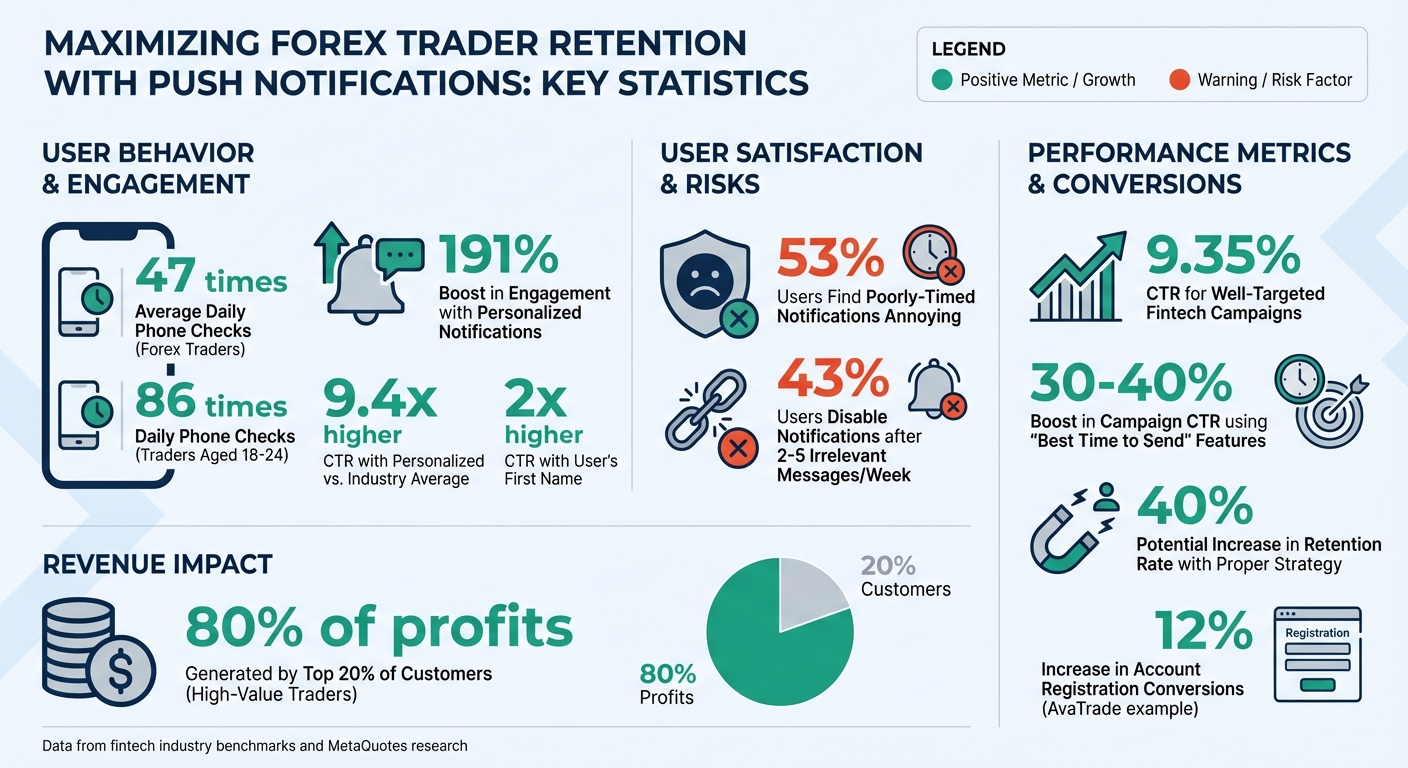
Push notifications are an effective way to keep Forex traders engaged by delivering timely updates, market alerts, and personalized insights directly to their smartphones. With Forex traders checking their phones up to 47 times daily (86 times for ages 18–24), these notifications provide an opportunity to drive engagement and action.
Here’s how to use push notifications effectively:
- Segment Your Audience: Group traders by activity level, trading style, and account value to send relevant updates. For example, scalpers need instant alerts, while swing traders prefer periodic summaries.
- Time Notifications Right: Schedule messages based on user behavior and time zones. Avoid sending updates during inactive hours to prevent annoyance.
- Personalize Messages: Tailor notifications with user-specific data like preferred currency pairs or trading habits. Personalized messages can boost engagement by up to 191%.
- Focus on Actionable Content: Alerts should prompt immediate action, such as price changes, margin warnings, or security updates. Keep messages clear and concise.
- Ensure Reliable Delivery: Use tools like MetaQuotes integration for MetaTrader platforms to guarantee instant and accurate delivery.
- Track and Optimize: Monitor metrics like click-through rates and opt-out rates to refine your strategy and improve performance.
Push Notification Statistics for Forex Trader Retention
Segment Traders for Targeted Notifications
Forex traders come in all shapes and sizes – some, like scalpers, thrive on making dozens of trades daily and rely on real-time alerts. Others, like swing traders, prefer holding positions for days or weeks, needing only occasional updates. Sending the same generic notifications to all traders isn’t just ineffective – it can overwhelm users and push them away. The solution? Segmentation. By grouping traders based on their behavior, preferences, and account details, you can fine-tune when and how notifications are sent, creating a more personalized experience.
Identify Key Trader Segments
The first step is to divide your traders into meaningful groups. For example:
- Activity Level: Daily active traders might need instant updates, while dormant users (inactive for 14+ days) may respond better to reactivation incentives.
- Trading Style: Scalpers require immediate market alerts, whereas swing traders benefit from periodic insights or summaries.
- Account Value: High-value traders – those with substantial deposits – often drive the majority of revenue. Research indicates that 20% of customers typically account for 80% of profits. These VIP traders might appreciate quarterly earnings reports or interest rate updates more than basic tutorials. On the other hand, beginners at risk of losing interest could benefit from educational tips and risk management advice.
By understanding these nuances, you can ensure each trader gets information that resonates with their needs and trading habits.
Use Centralized CRM for Dynamic Segmentation
As your trader base expands, manually managing these segments becomes impossible. That’s where a centralized CRM like InTrading comes in. This system automatically organizes traders into groups using real-time data from various sources, such as trading activity, deposits, KYC status, preferred currency pairs, and login habits. The result? Unified trader profiles that update dynamically as behaviors change.
One effective tool for this is RFM analysis (Recency, Frequency, Monetary). It tracks when traders last logged in, how often they trade, and their total account value. For instance:
- A trader depositing $10,000 and trading EUR/USD daily might be labeled a "Champion", receiving frequent market updates.
- Another who hasn’t logged in for 30 days could be tagged as "About to Sleep", triggering a reactivation campaign.
With real-time segmentation in place, you can ensure every notification is targeted and timely, reaching traders at just the right moment in their lifecycle. Once these groups are established, you’re ready to fine-tune the timing of your push notifications for even better engagement.
Time Push Notifications for Maximum Engagement
Once you’ve segmented traders based on their behavior, the next step is nailing the timing of your notifications. Even the most spot-on message can flop if it lands at the wrong time. Studies reveal that 53% of users find push notifications annoying when they’re poorly timed, and 43% will disable them after receiving just 2–5 irrelevant updates in a week. This makes pinpointing the right moment to reach traders just as important as crafting the message itself. Timing becomes even more effective when you factor in trader time zones.
Schedule Based on Trader Time Zones
For Forex traders in the U.S., timing is everything. Mobile app activity spikes between 9:00 AM–11:00 AM, during lunch hours (12:00–2:00 PM), and in the evening (9:00–11:00 PM). On desktops, usage peaks mid-morning and early afternoon. To avoid annoying your audience, steer clear of sending messages during inactive hours, typically between 10:00 PM and 8:00 AM. For time-sensitive signals, send them immediately – delays can diminish their value. Once you’ve nailed the timing, automation can take it a step further by tailoring notifications to individual trader behavior.
Use Lifecycle Automation for Triggered Notifications
When managing thousands of traders across various time zones, manual scheduling just isn’t practical. That’s where automation steps in. Platforms like InTrading can trigger notifications based on real-time events and inactivity patterns. For instance, if a trader deposits funds but doesn’t complete their KYC, the system can instantly send a reminder.
Automation also shines in responding to in-app events. These real-time notifications are essential: features like “best time to send” analyze user behavior to determine the perfect delivery time, which can boost campaign click-through rates by 30–40%. The system learns when each trader is most active and schedules messages accordingly, ensuring your notification lands when they’re most likely to engage.
Write Clear and Actionable Notification Content
Once you’ve nailed the timing of your notifications, the next step is crafting clear and concise messages that drive action. Timing might grab attention, but it’s the message content that pushes users to act. Keep titles under 50 characters and body text between 14–25 words to ensure nothing gets cut off. Use active voice to make your message direct and personal – compare "Your EUR/USD order filled at 1.0850" to "An order was filled." The former is shorter, clearer, and feels tailored to the user.
Focus on Actionable Alerts
The best notifications are those that prompt immediate action. For instance, price alerts are most effective when they’re specific: "EUR/USD dropped below 1.0800" gives traders clear, actionable information. Alerts about market volatility are particularly useful during major events like Federal Reserve announcements or employment reports. Trading signals, such as moving average crossovers, can be automated to notify traders when their strategies align with market conditions. Risk management alerts – think stop-loss triggers, margin calls, or balance warnings – are crucial for building trust by protecting users from unexpected losses. Similarly, security alerts, such as notifications for suspicious logins or large withdrawals, are urgent and demand immediate attention. Once your alerts are actionable and succinct, customizing them based on individual trader preferences can take their effectiveness to the next level.
Personalize Messages Using Trader Data
Generic notifications are a thing of the past. Personalized push notifications can boost user engagement by as much as 191% compared to generic ones. In 2025, one trading platform saw incredible results by embedding real-time data – like order sizes, trade details, and closing rates – right into their notifications. This strategy led to a click-through rate (CTR) 9.4 times higher than the industry average. Platforms like InTrading’s AI Data Helper follow a similar approach, tailoring messages with specifics like favorite currency pairs or recent trading habits. For example, a beginner might get tips about responsible trading, while a seasoned trader receives insights on geopolitical market shifts. Even something as simple as including a user’s first name can double CTR. Behavioral triggers make these messages even more powerful. If a trader frequently trades GBP/JPY during London session hours, send them a volatility alert for that pair just before the session begins. To avoid overwhelming users, set limits on notification frequency – 43% of users will disable notifications after receiving just 2–5 irrelevant messages in a single week.
"Treat them as individuals. That is how you win their loyalty. So, it’s crucial to know what they trade, why they trade, how they trade, when, and where." – Dafna Bitman, Content Marketing Manager, Optimove
Set Up Technical Requirements for Reliable Delivery
Even the most well-crafted notification is pointless if it never reaches its audience. When it comes to Forex trading, setting up the technical framework for push notifications – especially on MetaTrader platforms – is essential. Proper integration ensures your alerts are delivered instantly and reliably, keeping traders informed when timing is critical. By addressing these technical steps upfront, you can avoid delivery failures and ensure your notifications hit their mark.
Enable Notifications with MetaQuotes Integration
For traders using MetaTrader 4 or MT5, everything starts with a unique MetaQuotes ID. This ID can be found in the MetaTrader mobile app under Settings > Messages. Once you have it, head over to the desktop terminal, navigate to Tools > Options > Notifications, check the "Enable Push Notifications" option, and input the MetaQuotes ID. You can even enter up to four IDs (separated by commas), allowing alerts to reach multiple devices at the same time.
To ensure notifications are sent without interruptions, keep the desktop terminal running or use a VPS. For automated notifications, developers can leverage the SendNotification() function in MQL4 or MQL5. If you prefer manual price alerts, you can configure them under the "Alerts" tab by selecting "Notification" as the action. Platforms like InTrading simplify this process with their Professional and Enterprise plans, managing the technical complexities while giving you full control over when and how notifications are sent.
Test and Optimize Notification Settings
Once your setup is complete, test the connection by using the "Test" button in the Notifications section. This sends a sample message to confirm the link between your desktop terminal and mobile device. If the test fails, check the "Journal" tab in the Terminal window, which logs error codes to help diagnose issues. For example:
- 4515: Communication problems
- 4517: Incorrect MetaQuotes ID
- 4518: Notifications sent too frequently
MetaTrader imposes strict limits to prevent spam and server overload. Messages must be under 255 characters, and you can send no more than 10 per minute or one every 0.5 seconds. These restrictions make it crucial to prioritize high-value alerts. Additionally, confirm that your mobile device allows notifications for the MetaTrader app, as operating system settings can block them. If your traders use both iOS and Android, test notifications on both platforms to ensure compatibility.
"Push notifications are noted for their instant delivery. Besides, there is no need to launch third-party applications and keep them running. Also, push notifications cannot be lost in delivery and users do not depend on a specific mobile network operator." – MetaQuotes
Track and Improve Performance
Once your push notifications are live and reaching traders’ devices, the next phase begins: analyzing performance. By building on precise segmentation and timely delivery, tracking key metrics will help you confirm whether your strategy is hitting the mark. Without this data, you risk losing your audience.
Monitor Key Metrics
Keep an eye on metrics like opt-in rate, direct open rate, and influenced open rate to measure both immediate and delayed engagement. The click-through rate (CTR) is another crucial indicator; in fintech, a well-targeted campaign can achieve a CTR of over 9.35%. The conversion rate tells you how many traders take specific actions – like executing trades or depositing funds – after receiving a notification. Additionally, track the retention rate (how many users remain active over time) and the reactivation rate (how many dormant users re-engage). Done right, strategies can boost retention by as much as 40%.
InTrading’s Professional and Enterprise plans offer real-time tracking tools that consolidate all these metrics into a single dashboard. This makes it easier to identify issues before they escalate. Also, monitor opt-out rates and uninstall rates, as they often signal notification fatigue or irrelevant content.
"The two metrics you never want to grow are opt-outs and uninstalls. They show how many users were dissatisfied with your push notifications." – Elena Montoya, Head of Marketing at Pushwoosh
These insights are essential for fine-tuning your push notification strategy.
Adjust Strategy Based on Data
With these metrics in hand, you can refine your approach to turn attention into action. Data alone isn’t enough – what you do with it matters. For instance, if your open rates are strong but conversions are low, your notifications might grab attention but fail to inspire the desired action. Experiment with different calls-to-action (CTAs) or use deep linking to direct traders to specific trading pairs or deposit pages.
If regional activity patterns emerge – such as users in certain areas being more active at specific times – adjust your notification schedule to match their peak engagement hours. Use A/B testing to tweak individual elements like headlines, emojis, or message length to see what resonates most. For example, AvaTrade achieved a CTR 9.4 times higher than the industry average by using dynamic, personalized push notifications. They also saw a 12% increase in account registration conversions. Even small touches, like including a trader’s first name, can double your CTR compared to generic messaging.
For high-volatility events, use rate limiting to stagger notifications and avoid server overload. Tag users who interact with a notification but don’t convert – such as labeling them with "Retention drop-off" – and follow up with campaigns that offer stronger incentives or clearer CTAs. The goal isn’t to send more notifications; it’s to send smarter, more relevant ones.
Conclusion
Keeping Forex traders engaged takes a mix of smart audience segmentation, well-timed communication, and clear, tailored messaging. By focusing on the right audience, crafting personalized messages, and delivering them at the perfect moment, click-through rates can soar to 9.35% – a figure that’s more than 14 times higher than the fintech industry average.
This strategy thrives on solid technical integration. Ensuring seamless delivery, offering actionable content, and using deep linking to direct traders to the most relevant pages – be it a currency pair chart or a deposit page – reduces friction and boosts conversions.
InTrading’s CRM and marketing automation tools bring these elements together effortlessly. With features like dynamic segmentation and lifecycle automation, the platform sends out targeted notifications that prompt timely actions. Plus, its real-time analytics help track key metrics like conversion and retention rates, allowing for quick adjustments when needed. These tools elevate simple notifications into effective retention solutions.
Push notifications, when treated as strategic touchpoints rather than repetitive broadcasts, can make a big difference. As Valentina Stepanova from Pushwoosh explains:
"Fintech users are ready to engage, but not with daily blasts. You need to meet them with the right message at the right time in their lifecycle."
FAQs
How do push notifications help retain Forex traders?
Push notifications are an excellent way to keep Forex traders engaged by offering real-time, personalized updates. These can range from market news and trade alerts to exclusive deals, all designed to match individual preferences. This keeps traders informed and actively involved.
When done right, push notifications can play a key role in improving retention. They re-engage users by prompting timely actions and delivering value exactly when it’s needed. Over time, this not only strengthens trust but also fosters loyalty, ensuring traders remain connected to your platform.
What should you consider when segmenting Forex traders for push notifications?
Segmenting Forex traders is crucial for crafting push notifications that feel personal, timely, and relevant – qualities that play a big role in keeping traders engaged. To do this well, you need to dig into each trader’s behavior, preferences, and where they are in their trading journey.
Here’s what to pay attention to:
- Trading activity: Look at how often they log in, open positions, or close trades.
- Account value and risk level: Spot high-value traders and identify those who might be at risk of losing interest.
- Preferred instruments: Focus on the currency pairs or assets they trade most frequently.
- Trading times: Time your notifications to match their active trading sessions, whether that’s during U.S. or European market hours.
When you combine these insights, you can send notifications that truly connect – like a real-time alert about a market shift in their favorite currency pair or a message to re-engage a trader who’s been inactive. Smart segmentation like this makes your messages more engaging and helps you retain Forex traders effectively.
Why does timing matter for push notifications in Forex trading?
Timing plays a crucial role in the effectiveness of push notifications. Sending alerts when traders are actively monitoring the market ensures they resonate more and are likely to drive engagement. For example, aligning notifications with peak Forex trading hours – like when major market sessions overlap – can significantly boost the chances of catching a trader’s attention and prompting action.
On the flip side, poorly timed notifications can come across as intrusive, potentially frustrating users or even leading them to opt out entirely. By paying attention to your audience’s habits and the rhythms of market activity, you can craft notifications that feel helpful and relevant rather than disruptive.